Visual iteration
Create a cafe opening graphic with warm light, a paper menu and wooden surfaces. Make the headline “OPEN TODAY” clearly readable.
Use an explicit scene and headline when iterating visual concepts.
Create images with GPT Image 2.6 Flare using text, images. Available resolutions: 1k / 2k / 4k. Try the current API settings, preview results and reuse your inputs.
gpt-image-2.6-flaresize: auto · quality: medium · output_format: gifgpt-image-2.6-flaresize: auto · quality: medium · output_format: gifgpt-image-2.6-flareaspect_ratio: 9:16 · resolution: 2k · quality: high · output_format: jpeg{
"model": "gpt-image-2.6-flare",
"input": {
"quality": "high",
"resolution": "2k",
"output_format": "jpeg",
"aspect_ratio": "9:16",
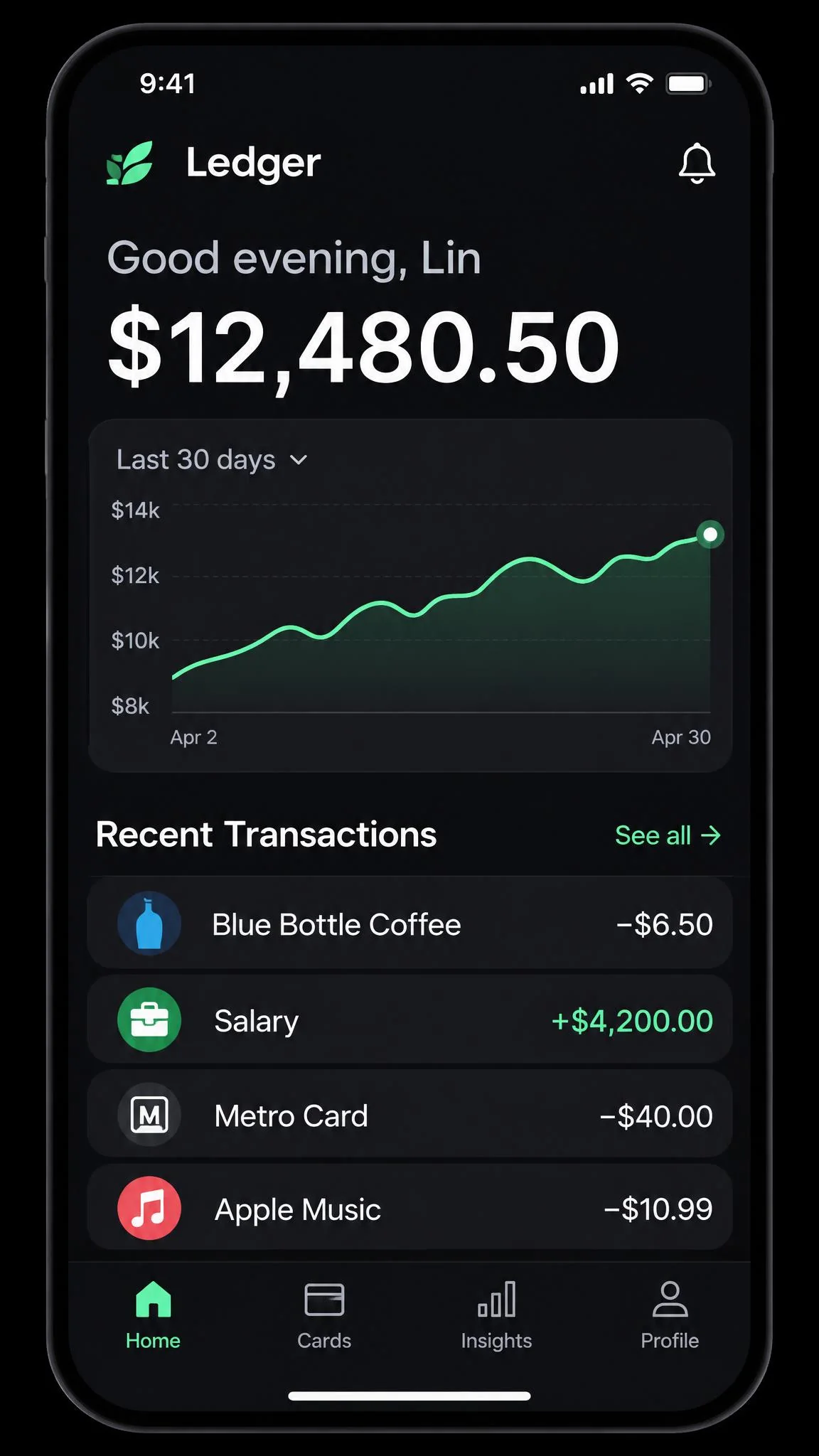
"prompt": "A polished mobile app screen for a fictional personal finance app called \"Ledger\". Dark mode. Header \"Good evening, Lin\". A large balance \"$12,480.50\". A smooth line chart for the last 30 days. A list of four transactions with icons: \"Blue Bottle Coffee −$6.50\", \"Salary +$4,200.00\", \"Metro Card −$40.00\", \"Apple Music −$10.99\". A bottom tab bar with Home, Cards, Insights, Profile. Crisp UI rendering on a plain dark background, all text and numbers exactly as written."
}
}The example follows your Playground parameters.
curl --request POST 'https://newrouters.com/v1/tasks' \
  --header 'Content-Type: application/json' \
  --header "Authorization: Bearer $MODEL_API_KEY" \
  --data '{
  "model": "gpt-image-2.6-flare",
  "input": {
    "quality": "high",
    "resolution": "2k",
    "output_format": "jpeg",
    "aspect_ratio": "9:16",
    "prompt": "A polished mobile app screen for a fictional personal finance app called \"Ledger\". Dark mode. Header \"Good evening, Lin\". A large balance \"$12,480.50\". A smooth line chart for the last 30 days. A list of four transactions with icons: \"Blue Bottle Coffee  −$6.50\", \"Salary  +$4,200.00\", \"Metro Card  −$40.00\", \"Apple Music  −$10.99\". A bottom tab bar with Home, Cards, Insights, Profile. Crisp UI rendering on a plain dark background, all text and numbers exactly as written."
  }
}'
Set MODEL_API_KEY in your environment. Keep your secret key on the server. Full documentation ↗
POST /v1/tasks · Authorization: Bearer
curl 'https://newrouters.com/v1/tasks' \
  -H "Content-Type: application/json" \
  -H "Authorization: Bearer $MODEL_API_KEY" \
  --data '{
  "model": "gpt-image-2.6-flare",
  "input": {
    "quality": "medium",
    "resolution": "2k",
    "output_format": "jpeg",
    "prompt": "A quiet mountain lake at sunrise, soft morning light.",
    "size": "auto"
  }
}'const response = await fetch("https://newrouters.com/v1/tasks", {
method: "POST",
headers: {
"Content-Type": "application/json",
"Authorization": "Bearer $MODEL_API_KEY"
},
body: JSON.stringify({
"model": "gpt-image-2.6-flare",
"input": {
"quality": "medium",
"resolution": "2k",
"output_format": "jpeg",
"prompt": "A quiet mountain lake at sunrise, soft morning light.",
"size": "auto"
}
})
});
if (!response.ok) throw new Error(await response.text());
console.log(await response.text());import json
import requests
response = requests.post(
"https://newrouters.com/v1/tasks",
headers=json.loads("{\"Content-Type\":\"application/json\",\"Authorization\":\"Bearer $MODEL_API_KEY\"}"),
json=json.loads("{\"model\":\"gpt-image-2.6-flare\",\"input\":{\"quality\":\"medium\",\"resolution\":\"2k\",\"output_format\":\"jpeg\",\"prompt\":\"A quiet mountain lake at sunrise, soft morning light.\",\"size\":\"auto\"}}"),
timeout=300,
)
response.raise_for_status()
print(response.text)Poll the returned task ID for processing status and output assets.
curl -H "Authorization: Bearer $MODEL_API_KEY" "https://newrouters.com/v1/tasks/$TASK_ID"Documentation: Authentication · Task status and results · Error handling
| Parameter | Type | Values & constraints |
|---|---|---|
mask | object | |
size | string | Takes precedence over aspect_ratio. auto is priced as 2k and routes only to channels that support native auto. Concrete WxH uses native passthrough or the channel nearest-size policy. |
count | integer | 1 |
images | array | |
markup | object | |
prompt * | string | |
quality | JSON | "low" · "medium" · "high" · "xhigh" · "max" · "auto"Default: "medium" |
background | JSON | "auto" · "transparent" · "opaque" |
complexity | JSON | "low" · "medium" · "high" |
moderation | JSON | "auto" · "low" |
resolution | JSON | "1k" · "2k" · "4k"Default: "1k" |
frame_count | integer | |
aspect_ratio | JSON | "21:9" · "16:9" · "3:2" · "4:3" · "5:4" · "1:1" · "4:5" · "3:4" · "2:3" · "9:16" · "2:1" · "1:2" · "9:21" |
output_format | JSON | "png" · "jpeg" · "webp" · "gif" · "svg"Default: "jpeg" |
prompt_rewriter | JSON | |
response_format | JSON | "url" · "b64_json" |
frame_duration_ms | integer | |
safety_identifier | string | |
output_compression | integer |
{
  "type": "object",
  "allOf": [
    {
      "if": {
        "anyOf": [
          {
            "required": [
              "frame_count"
            ]
          },
          {
            "required": [
              "frame_duration_ms"
            ]
          }
        ]
      },
      "then": {
        "required": [
          "output_format"
        ],
        "properties": {
          "output_format": {
            "const": "gif"
          }
        }
      }
    },
    {
      "if": {
        "required": [
          "markup"
        ]
      },
      "then": {
        "not": {
          "anyOf": [
            {
              "required": [
                "mask"
              ]
            },
            {
              "required": [
                "prompt_rewriter"
              ]
            }
          ]
        },
        "required": [
          "images"
        ],
        "properties": {
          "images": {
            "minItems": 1
          }
        }
      }
    },
    {
      "if": {
        "required": [
          "mask"
        ]
      },
      "then": {
        "required": [
          "images"
        ],
        "properties": {
          "images": {
            "minItems": 1
          }
        }
      }
    },
    {
      "if": {
        "required": [
          "output_format"
        ],
        "properties": {
          "output_format": {
            "const": "svg"
          }
        }
      },
      "then": {
        "properties": {
          "images": {
            "maxItems": 0
          }
        }
      }
    },
    {
      "if": {
        "required": [
          "output_format"
        ],
        "properties": {
          "output_format": {
            "enum": [
              "gif",
              "svg"
            ]
          }
        }
      },
      "then": {
        "not": {
          "required": [
            "output_compression"
          ]
        },
        "properties": {}
      }
    }
  ],
  "required": [
    "prompt"
  ],
  "properties": {
    "mask": {
      "type": "object",
      "required": [
        "image_url"
      ],
      "properties": {
        "image_url": {
          "type": "string",
          "pattern": "^(?:https?://|data:image/png;base64,)",
          "minLength": 1
        }
      },
      "additionalProperties": false
    },
    "size": {
      "type": "string",
      "pattern": "^(?:auto|[1-9][0-9]{1,4}x[1-9][0-9]{1,4})$",
      "description": "Takes precedence over aspect_ratio. auto is priced as 2k and routes only to channels that support native auto. Concrete WxH uses native passthrough or the channel nearest-size policy."
    },
    "count": {
      "enum": [
        1
      ],
      "type": "integer"
    },
    "images": {
      "type": "array",
      "items": {
        "type": "string",
        "minLength": 1
      },
      "maxItems": 20
    },
    "markup": {
      "type": "object",
      "required": [
        "image_url"
      ],
      "properties": {
        "image_url": {
          "type": "string",
          "pattern": "^(?:https?://|data:image/png;base64,)",
          "minLength": 1
        }
      },
      "additionalProperties": false
    },
    "prompt": {
      "type": "string",
      "maxLength": 100000,
      "minLength": 1
    },
    "quality": {
      "enum": [
        "low",
        "medium",
        "high",
        "xhigh",
        "max",
        "auto"
      ],
      "default": "medium"
    },
    "background": {
      "enum": [
        "auto",
        "transparent",
        "opaque"
      ]
    },
    "complexity": {
      "enum": [
        "low",
        "medium",
        "high"
      ]
    },
    "moderation": {
      "enum": [
        "auto",
        "low"
      ]
    },
    "resolution": {
      "enum": [
        "1k",
        "2k",
        "4k"
      ],
      "default": "1k"
    },
    "frame_count": {
      "type": "integer",
      "maximum": 16,
      "minimum": 2
    },
    "aspect_ratio": {
      "enum": [
        "21:9",
        "16:9",
        "3:2",
        "4:3",
        "5:4",
        "1:1",
        "4:5",
        "3:4",
        "2:3",
        "9:16",
        "2:1",
        "1:2",
        "9:21"
      ]
    },
    "output_format": {
      "enum": [
        "png",
        "jpeg",
        "webp",
        "gif",
        "svg"
      ],
      "default": "jpeg"
    },
    "prompt_rewriter": {},
    "response_format": {
      "enum": [
        "url",
        "b64_json"
      ]
    },
    "frame_duration_ms": {
      "type": "integer",
      "maximum": 2000,
      "minimum": 20
    },
    "safety_identifier": {
      "type": "string",
      "maxLength": 128
    },
    "output_compression": {
      "type": "integer",
      "maximum": 100,
      "minimum": 0
    }
  },
  "additionalProperties": false
}Estimate one request, then choose a budget for your workflow.
| Usage | Quantity | Rate | Cost |
|---|---|---|---|
| quality · low | 1 request | $0.02/ request | $0.02 |
Public USD estimate. Your account rate and final recorded usage determine the actual charge.
| Specification | Our price | Official reference |
|---|---|---|
| quality · low | $0.02 / request | — |
| quality · medium | $0.04 / request | — |
| quality · high | $0.1 / request | — |
| quality · xhigh | $0.2 / request | — |
| quality · max | $0.4 / request | — |
Capability-based prompts and platform-generated examples are labeled separately, with their sources.
Official capability source ↗ · 2026-11-05
Create a cafe opening graphic with warm light, a paper menu and wooden surfaces. Make the headline “OPEN TODAY” clearly readable.
Use an explicit scene and headline when iterating visual concepts.Create a product photograph of an original blue ceramic vase against pale stone, with natural side lighting, detailed glaze and a restrained composition.
Constrain a product image through materials, lighting and background.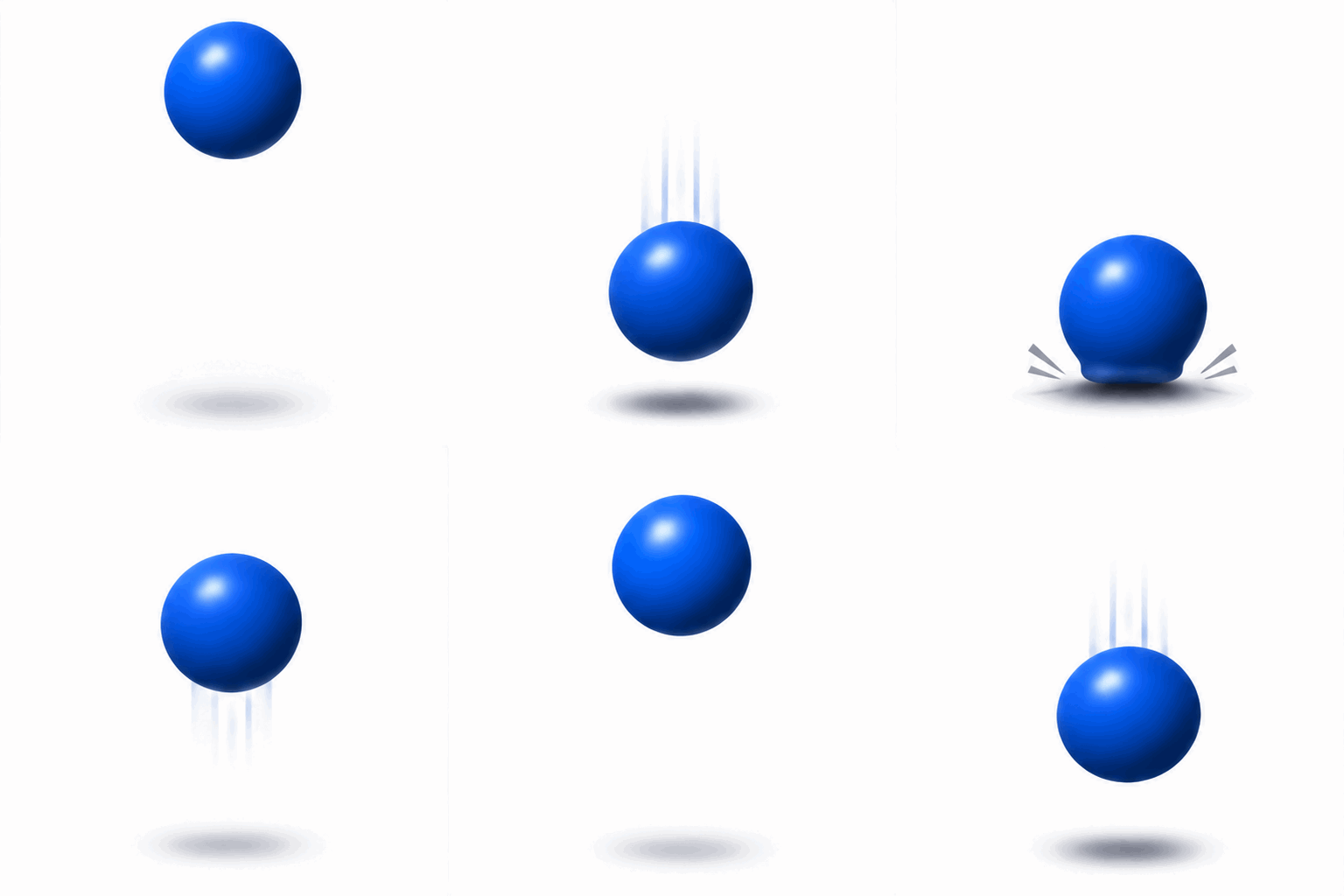
Looping animation of a bouncing blue ball on white.
| Specification | GPT Image 2.6 Flare | GPT Image 2 | GPT Image 2.5 Flare |
|---|---|---|---|
| Provider | OpenAI | OpenAI | OpenAI |
| Input → output | TextImageImage | TextImageImage | TextImageImage |
| Selection basis | Current model | Both declare text, image input · Same billing units | Both declare text, image input · Same billing units |
| Resolution | 1k / 2k / 4k | 1k / 2k / 4k | 1k / 2k / 4k |
| Reference images | 20 | 20 | 20 |
| Starting price | $0.02 / request | $0.02 / request | $0.02 / request |
Choose by the input types, output settings and billing unit your workflow needs. Try the same prompt across models to compare results for your own use case.
Create images with GPT Image 2.6 Flare using text, images. Available resolutions: 1k / 2k / 4k. Try the current API settings, preview results and reuse your inputs.
Generate and edit product images and illustrations for fast visual iteration.
Official model information ↗ · 2026-11-05
| Model ID | gpt-image-2.6-flare |
|---|---|
| Provider | OpenAI |
| API | /v1/tasks |
| Resolution | 1k / 2k / 4k |
| Aspect ratio | 21:9 / 16:9 / 3:2 / 4:3 / 5:4 / 1:1 / 4:5 / 3:4 / 2:3 / 9:16 / 2:1 / 1:2 / 9:21 |
| Quality | low / medium / high / xhigh / max / auto |
| Output format | png / jpeg / webp / gif / svg |
| Background | auto / transparent / opaque |
| Reference images | Up to 20 |
Answers about pricing, inputs, integration and results.
The current public price starts at $0.02 / request. The pricing section lists each specification. Playground checks your account price before submitting; the completed request records the final charge.
Sign in and open Quick Start above the workspace. Select or create a key with access to this model, then copy the request example.
Supported input fields: mask, size, count, images, markup, prompt, quality, background, complexity, moderation, resolution, frame_count, aspect_ratio, output_format, prompt_rewriter, response_format, frame_duration_ms, safety_identifier, output_compression. The parameter table includes allowed values and defaults.
Yes. Use the reference mode to upload images or supply their URLs. The current limit is 20 images. Reference images guide a new generation; they do not imply mask editing support.
Save the returned task ID and query the task until it succeeds or fails. The History tab lets you reopen your tasks and reuse their parameters.
The model keeps its page and identity, but new generation requests are blocked. Existing task records remain accessible. An upstream outage is reported separately from an administrator closing the model.