Precise reference-image edit
Preserve the product shape, markings and materials in the reference image. Replace only the background with a light-gray studio, matching lighting and shadows.
Try this prompt ↗
Create images with GPT Image 2.5 Sunburst using text, images. Available resolutions: 1k / 2k / 4k. Try the current API settings, preview results and reuse your inputs.
gpt-image-2.5-sunburstaspect_ratio: 16:9 · resolution: 2k · quality: medium · output_format: jpeg{
"model": "gpt-image-2.5-sunburst",
"input": {
"quality": "medium",
"resolution": "2k",
"output_format": "jpeg",
"aspect_ratio": "16:9",
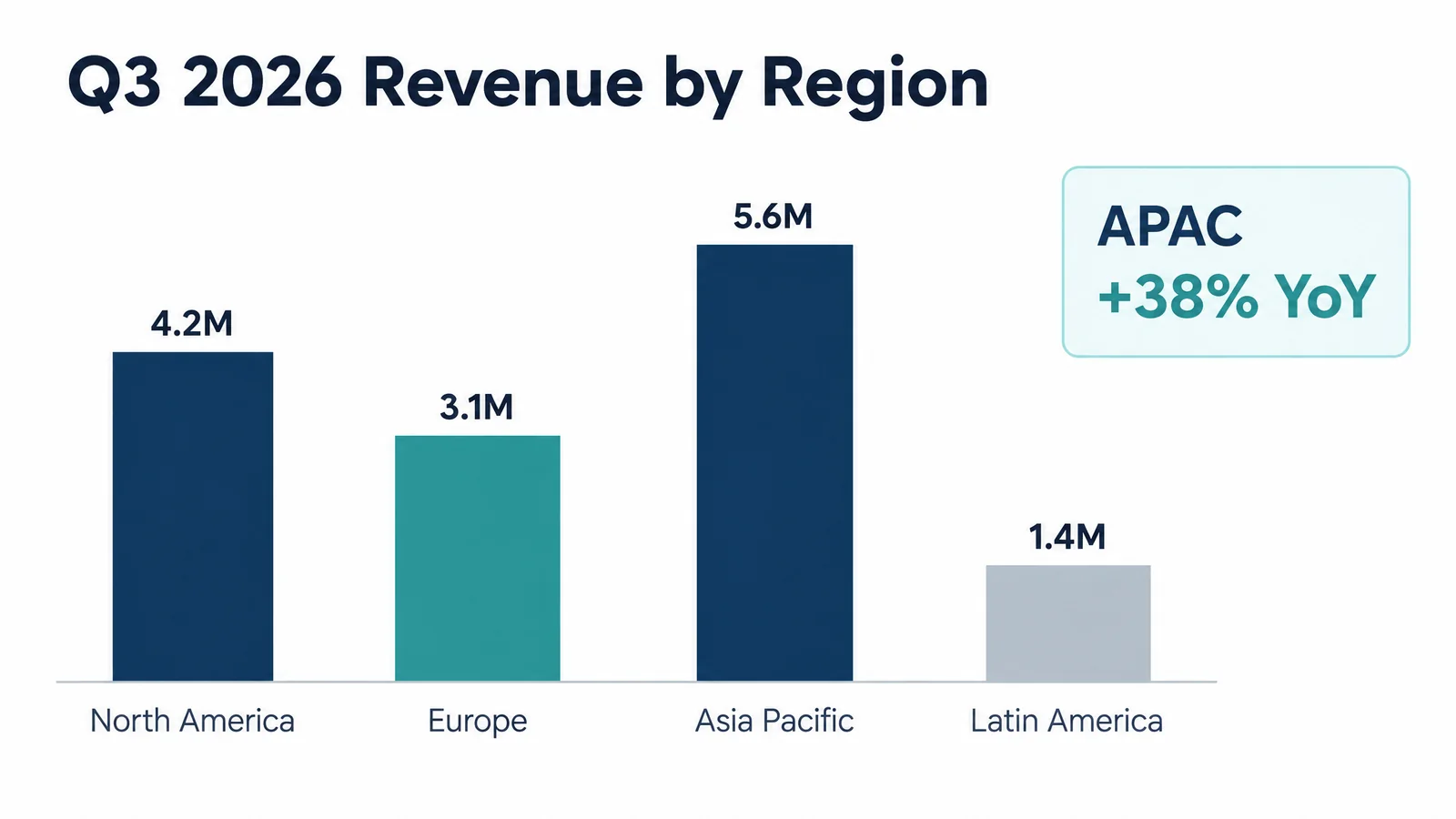
"prompt": "A clean corporate presentation slide, white background, title \"Q3 2026 Revenue by Region\". A grouped bar chart with four regions on the x-axis labeled \"North America\", \"Europe\", \"Asia Pacific\", \"Latin America\" and values \"4.2M\", \"3.1M\", \"5.6M\", \"1.4M\" printed above the bars. A right-side callout box: \"APAC +38% YoY\". Navy, teal and soft gray palette, precise alignment, no other text."
}
}The example follows your Playground parameters.
curl --request POST 'https://newrouters.com/v1/tasks' \
  --header 'Content-Type: application/json' \
  --header "Authorization: Bearer $MODEL_API_KEY" \
  --data '{
  "model": "gpt-image-2.5-sunburst",
  "input": {
    "quality": "medium",
    "resolution": "2k",
    "output_format": "jpeg",
    "aspect_ratio": "16:9",
    "prompt": "A clean corporate presentation slide, white background, title \"Q3 2026 Revenue by Region\". A grouped bar chart with four regions on the x-axis labeled \"North America\", \"Europe\", \"Asia Pacific\", \"Latin America\" and values \"4.2M\", \"3.1M\", \"5.6M\", \"1.4M\" printed above the bars. A right-side callout box: \"APAC +38% YoY\". Navy, teal and soft gray palette, precise alignment, no other text."
  }
}'
Set MODEL_API_KEY in your environment. Keep your secret key on the server. Full documentation ↗
POST /v1/tasks · Authorization: Bearer
curl 'https://newrouters.com/v1/tasks' \
  -H "Content-Type: application/json" \
  -H "Authorization: Bearer $MODEL_API_KEY" \
  --data '{
  "model": "gpt-image-2.5-sunburst",
  "input": {
    "quality": "medium",
    "resolution": "2k",
    "output_format": "jpeg",
    "prompt": "A quiet mountain lake at sunrise, soft morning light.",
    "size": "auto"
  }
}'const response = await fetch("https://newrouters.com/v1/tasks", {
method: "POST",
headers: {
"Content-Type": "application/json",
"Authorization": "Bearer $MODEL_API_KEY"
},
body: JSON.stringify({
"model": "gpt-image-2.5-sunburst",
"input": {
"quality": "medium",
"resolution": "2k",
"output_format": "jpeg",
"prompt": "A quiet mountain lake at sunrise, soft morning light.",
"size": "auto"
}
})
});
if (!response.ok) throw new Error(await response.text());
console.log(await response.text());import json
import requests
response = requests.post(
"https://newrouters.com/v1/tasks",
headers=json.loads("{\"Content-Type\":\"application/json\",\"Authorization\":\"Bearer $MODEL_API_KEY\"}"),
json=json.loads("{\"model\":\"gpt-image-2.5-sunburst\",\"input\":{\"quality\":\"medium\",\"resolution\":\"2k\",\"output_format\":\"jpeg\",\"prompt\":\"A quiet mountain lake at sunrise, soft morning light.\",\"size\":\"auto\"}}"),
timeout=300,
)
response.raise_for_status()
print(response.text)Poll the returned task ID for processing status and output assets.
curl -H "Authorization: Bearer $MODEL_API_KEY" "https://newrouters.com/v1/tasks/$TASK_ID"Documentation: Authentication · Task status and results · Error handling
| Parameter | Type | Values & constraints |
|---|---|---|
mask | object | |
size | string | Deprecated compatibility field. Prefer aspect_ratio. |
count | integer | 1 |
images | array | |
prompt * | string | |
quality | JSON | "low" · "medium" · "high" · "xhigh" · "max" · "auto"Default: "medium" |
background | JSON | "auto" · "transparent" · "opaque" |
resolution | JSON | "1k" · "2k" · "4k"Default: "1k" |
aspect_ratio | JSON | "21:9" · "16:9" · "3:2" · "4:3" · "5:4" · "1:1" · "4:5" · "3:4" · "2:3" · "9:16" |
output_format | JSON | "png" · "jpeg" · "webp"Default: "jpeg" |
response_format | JSON | "url" · "b64_json" |
output_compression | integer |
{
  "type": "object",
  "allOf": [
    {
      "if": {
        "required": [
          "mask"
        ]
      },
      "then": {
        "required": [
          "images"
        ],
        "properties": {
          "images": {
            "minItems": 1
          }
        }
      }
    }
  ],
  "required": [
    "prompt"
  ],
  "properties": {
    "mask": {
      "type": "object",
      "required": [
        "image_url"
      ],
      "properties": {
        "image_url": {
          "type": "string",
          "pattern": "^(?:https?://|data:image/png;base64,)",
          "minLength": 1
        }
      },
      "additionalProperties": false
    },
    "size": {
      "type": "string",
      "pattern": "^(?:auto|[1-9][0-9]{1,4}x[1-9][0-9]{1,4})$",
      "deprecated": true,
      "description": "Deprecated compatibility field. Prefer aspect_ratio."
    },
    "count": {
      "enum": [
        1
      ],
      "type": "integer"
    },
    "images": {
      "type": "array",
      "items": {
        "type": "string",
        "minLength": 1
      },
      "maxItems": 20
    },
    "prompt": {
      "type": "string",
      "maxLength": 100000,
      "minLength": 1
    },
    "quality": {
      "enum": [
        "low",
        "medium",
        "high",
        "xhigh",
        "max",
        "auto"
      ],
      "default": "medium"
    },
    "background": {
      "enum": [
        "auto",
        "transparent",
        "opaque"
      ]
    },
    "resolution": {
      "enum": [
        "1k",
        "2k",
        "4k"
      ],
      "default": "1k"
    },
    "aspect_ratio": {
      "enum": [
        "21:9",
        "16:9",
        "3:2",
        "4:3",
        "5:4",
        "1:1",
        "4:5",
        "3:4",
        "2:3",
        "9:16"
      ]
    },
    "output_format": {
      "enum": [
        "png",
        "jpeg",
        "webp"
      ],
      "default": "jpeg"
    },
    "response_format": {
      "enum": [
        "url",
        "b64_json"
      ]
    },
    "output_compression": {
      "type": "integer",
      "maximum": 100,
      "minimum": 0
    }
  },
  "additionalProperties": false
}Estimate one request, then choose a budget for your workflow.
| Usage | Quantity | Rate | Cost |
|---|---|---|---|
| quality · low | 1 request | $0.02/ request | $0.02 |
Public USD estimate. Your account rate and final recorded usage determine the actual charge.
| Specification | Our price | Official reference |
|---|---|---|
| quality · low | $0.02 / request | — |
| quality · medium | $0.04 / request | — |
| quality · high | $0.1 / request | — |
| quality · xhigh | $0.2 / request | — |
| quality · max | $0.4 / request | — |
Official source ↗ · 2026-10-14
Original prompts adapted to documented capabilities; use platform-supported parameters.
Preserve the product shape, markings and materials in the reference image. Replace only the background with a light-gray studio, matching lighting and shadows.
Try this prompt ↗Design a modern exhibition poster headed “LIGHT & FORM” with subtitle “October 2026”. Use clear typography, generous space and geometric composition.
Try this prompt ↗| Specification | GPT Image 2.5 Sunburst | GPT Image 2 | GPT Image 2.5 Flare |
|---|---|---|---|
| Provider | OpenAI | OpenAI | OpenAI |
| Input → output | TextImageImage | TextImageImage | TextImageImage |
| Selection basis | Current model | Both declare text, image input · Same billing units | Both declare text, image input · Same billing units |
| Resolution | 1k / 2k / 4k | 1k / 2k / 4k | 1k / 2k / 4k |
| Reference images | 20 | 20 | 20 |
| Starting price | $0.02 / request | $0.02 / request | $0.02 / request |
Choose by the input types, output settings and billing unit your workflow needs. Try the same prompt across models to compare results for your own use case.
Create images with GPT Image 2.5 Sunburst using text, images. Available resolutions: 1k / 2k / 4k. Try the current API settings, preview results and reuse your inputs.
GPT Image 2.5 Sunburst emphasizes image generation and precise editing when reference fidelity and edit accuracy matter.
Official model information ↗ · 2026-10-14
| Model ID | gpt-image-2.5-sunburst |
|---|---|
| Provider | OpenAI |
| API | /v1/tasks |
| Resolution | 1k / 2k / 4k |
| Aspect ratio | 21:9 / 16:9 / 3:2 / 4:3 / 5:4 / 1:1 / 4:5 / 3:4 / 2:3 / 9:16 |
| Quality | low / medium / high / xhigh / max / auto |
| Output format | png / jpeg / webp |
| Background | auto / transparent / opaque |
| Reference images | Up to 20 |
Answers about pricing, inputs, integration and results.
The current public price starts at $0.02 / request. The pricing section lists each specification. Playground checks your account price before submitting; the completed request records the final charge.
Sign in and open Quick Start above the workspace. Select or create a key with access to this model, then copy the request example.
Supported input fields: mask, count, images, prompt, quality, background, resolution, aspect_ratio, output_format, response_format, output_compression. The parameter table includes allowed values and defaults.
Yes. Use the reference mode to upload images or supply their URLs. The current limit is 20 images. Reference images guide a new generation; they do not imply mask editing support.
Save the returned task ID and query the task until it succeeds or fails. The History tab lets you reopen your tasks and reuse their parameters.
The model keeps its page and identity, but new generation requests are blocked. Existing task records remain accessible. An upstream outage is reported separately from an administrator closing the model.